Tuesday, March 25, 2008

Web Services with SQL Server 2005 HTTP Endpoints

SQL Server 2005's HTTP/SOAP endpoints provide SQL Server developers with new capabilities for using Web services within SQL Server. It's worth noting though that Web services aren't new to SQL Server 2005. In SQL Server 2000, SQLXML provided a set of supplemental tools that extended SQL Server's existing support for retrieving and storing XML data. SQLXML 3.0 supported Web services that enabled executing stored procedures, user-defined functions, and also supported templates. However, one of the challenges with SQLXML was a complex deployment process that required IIS to handle HTTP requests and enable the invocation of Web services.

In SQL Server 2005 the HTTP/SOAP endpoints feature lets you consume Web services mapped to objects in SQL Server. Unlike earlier versions, IIS is no longer required. The Windows Server 2003 kernel listener, HTTP.sys, lets SQL Server listen for HTTP requests and process them directly. This simplifies application development and deployment, and requires fewer infrastructure components—because it's not best practice to deploy IIS on the main SQL Server instance. In this article, you'll see what is required to create and expose an HTTP/SOAP endpoint for use in your application. You'll also see some considerations that can help you determine when this technology is appropriate, and when to avoid it.

HTTP/SOAP Endpoints Explained
SQL Server 2005 supports the concept of an endpoint—a service that listens for requests natively within the server. Each endpoint supports a protocol, which can be TCP or HTTP, and a payload type, which can include support for database mirroring, service broker, T-SQL, or SOAP. This article focuses on HTTP/SOAP endpoints supporting SOAP payloads—the core elements of a Web service implementation.

To get started, you first need to determine what object you want to expose from SQL Server. You can expose stored procedures or user-defined functions as the endpoints for the mapping but you can't expose tables or views directly. As an example, here's a simple stored procedure from the AdventureWorks database that you can use:

   CREATE PROCEDURE [dbo].[uspGetPersonInfo]       @ID [int]        AS    BEGIN        SET NOCOUNT ON;            SELECT [FirstName],[MiddleName],[LastName]          FROM [AdventureWorks].[Person].[Contact]          WHERE ContactID = @ID        END; 

This stored procedure simply returns the name of a person from the Person.Contact table in AdventureWorks based on a ContactID input parameter value, giving you a result set to test with. After defining which object you want to expose, you'll need to run the T-SQL commands that expose and launch the endpoint.


Creating and Launching Endpoints
You use the CREATE ENDPOINT statement to create an endpoint as shown below:

   CREATE ENDPOINT SQLEP_AWPersons        STATE = STARTED    AS HTTP    (        PATH = '/AWpersons',        AUTHENTICATION = (INTEGRATED),        PORTS = (CLEAR),        SITE = 'sqlidw14'    )    FOR SOAP    (        WEBMETHOD 'PersonInfo'            (NAME='AdventureWorks.dbo.uspGetPersonInfo'),        BATCHES = DISABLED,        WSDL = DEFAULT,        DATABASE = 'AdventureWorks',        NAMESPACE = 'http://Adventure-Works/Persons'    ) 
The CREATE ENDPOINT statement has several key components. The STATE argument is set to STARTED, which indicates that the endpoint listener is running. Other options included STOPPED and DISABLED for handling service endpoints. The rest of the code sits in the AS HTTP clause or the FOR SOAP clause. AS HTTP sets HTTP as the transport for the endpoint and includes the following settings:

  • PATH—Specifies the URL for the service endpoint, and in this example defaults to the server name and the path specified, e.g. http://yourdemoserver/AWpersons.
  • AUTHENTICATION—Specifies the type of authentication to be used for the service endpoint. A variety of authentication mechanisms are supported, including BASIC, INTEGRATED (uses Windows security), NTLM, and KERBEROS.
  • PORTS—Specifies what port type to use. CLEAR or SSL are the supported options, with CLEAR accepting only HTTP requests and SSL requiring HTTPS.
  • SITE—Specifies the name of the host computer for the endpoint.
The FOR SOAP clause supports the following arguments:

  • WEBMETHOD—Specifies the Web method used to send requests via the HTTP SOAP endpoint. You can declare multiple Web methods per endpoint.
  • BATCHES—Specifies whether not the endpoint supports ad-hoc SQL requests. This is disabled by default.
  • WSDL—Specifies whether the endpoint supports WSDL. For custom WSDL implementations, you can provide a stored procedure name that returns a custom WSDL implementation.
  • DATABASE—Specifies the name of the database where the requested operation is executed in context.
  • NAMESPACE—Specifies a namespace for the endpoint.
After creating the endpoint, you can submit an HTTP request to the server to ensure that the endpoint is responding. A simple test is to navigate to http://sqlidw14/awpersons?wsdl (substitute your own server and endpoint name), which, if the endpoint is responding, will return the WSDL for your exposed service.

To consume the Web service, simply follow the steps for adding a Web reference and invoking a Web service in a standard .NET application. The
downloadable sample application includes a simple application for testing purposes, including the following code to invoke the Web service:

   sqlidw14.SQLEP_AWPersons proxy = new        sqlidw14.SQLEP_AWPersons();          i = Convert.ToInt32(txtID.Text);        proxy.UseDefaultCredentials = true;       results = proxy.PersonInfo(i); 
After the Web service returns the results, the sample client application displays the data.


Modifying Existing Endpoints
Endpoints can be very useful, but any feature that relies on a mapping to underlying database objects must support the modification of those endpoints as needed. One common modification of an endpoint is to change its state. As you saw in the earlier example, the CREATE ENDPOINT statement supports a state argument that lets you start, stop, or disable the endpoint. So, to change the state of an endpoint, use a simple ALTER ENDPOINT statement as shown below.

   ALTER ENDPOINT SQLEP_AWPersons        STATE = STOPPED     
After stopping an endpoint, using a STATE = STARTED clause starts the endpoint listener again. However if the endpoint is DISABLED, you cannot start it again until the SQL Server service (MSSQLSERVER) is restarted.

You can also alter the endpoint in other ways. For example, the earlier CREATE ENDPOINT example enabled only one method for the SOAP endpoint. To add another method, use the following code:

   ALTER ENDPOINT SQLEP_AWPersons    FOR SOAP    (      ADD WEBMETHOD 'BillOfMaterials'        (name='AdventureWorks.dbo.uspGetBillOfMaterials')    ); 
When you run it, the preceding statement adds a second method mapped to a stored procedure in the AdventureWorks database that retrieves a bill of materials. In general, the ALTER ENDPOINT statement makes it easy to change endpoint state, add methods, and alter the endpoint as needed for your application.

When to Use HTTP/SOAP Endpoints
As you can see, creating an HTTP/SOAP endpoint is relatively simple, and you can implement one with only a few lines of code. But that begs the question: How and when should you use this functionality in your applications?

Like any new technology, you shouldn't use HTTP/SOAP endpoints simply for technology's sake, but rather as a tool that increases productivity or provides new capabilities. From an architectural perspective, HTTP/SOAP endpoints do introduce some problems. When you create an endpoint, you're adding a layer of abstraction to the database, and in the end you still need to write a program to consume a Web service to get to your data. If you're writing a .NET application and need to access data in SQL Server, using an HTTP/SOAP endpoint is probably not a good way to do that. On the other hand, if you're using a development tool or application that can consume Web services more easily than it can leverage APIs to access data in SQL Server, then HTTP/SOAP endpoints may be an appropriate solution.

One challenge with HTTP/SOAP endpoints is configuration management and security. While it is easy to create and expose an endpoint, best practices dictate that endpoint access should be restricted to individuals or small groups, that you use SSL to exchange data, that SQL Server reside behind a firewall, and that you use Kerberos for authentication. While these requirements do make sense given the importance of keeping your data secure, they may also take away from some of the perceived benefits of agility and ease of deployment for endpoint services. But you don't want to trade off security for agility.

In addition, you'll need to carefully consider the performance implications when evaluating the Web services features supported by HTTP/SOAP endpoints. If your application consumes and produces raw XML, or if your application relies on business logic already well represented by SQL Server stored procedures, then HTTP/SOAP endpoints can easily expose this business logic to other applications and may make a lot of sense for your solution. However, if your application inserts or retrieves large binary objects from a database, the overhead associated with converting those payloads into SOAP messages may not make sense. In addition, if your application has high mission-critical performance requirements, then HTTP/SOAP endpoints are not the appropriate tool to use for your implementation.

The ideal scenario for using HTTP/SOAP endpoints will be to integrate inside-the-firewall applications that support Web services. If you have an integration tool or other application that natively supports Web services but doesn't run on Windows or doesn't integrate easily with SQL Server, then the endpoints solution is a low-friction way to accomplish the integration with a minimal amount of code.

Leveraging HTTP/SOAP Endpoints Effectively
If you have data on the SQL Server platform and an extensive investment in stored procedures for those systems, you're already aware of the challenges associated with taking that code base and moving towards a more service-oriented approach to application deployment. As part of that effort, you'll want to keep a few key do's and don'ts in mind.

DO:
  • Use HTTP endpoints to simplify the process of exposing your database logic to your applications.
  • Focus on the use of HTTP endpoints for inside the firewall scenarios.
  • Leverage HTTP endpoints for solutions that don't require linear scale.
DON'T:
  • Use HTTP endpoints on SQL Servers directly connected to the Internet. If you can't avoid doing so, ensure that you're following all of the appropriate security guidelines and that you're leveraging the advanced authentication mechanisms available.
  • Put SQL Server on the same machines that support IIS or other Web server products (HTTP endpoints eliminates the need to do this).
  • Turn on the BATCHES capability that enables ad-hoc SQL commands to be processed through the endpoint.
Because HTTP endpoints can't effectively support a scale-out deployment model, you'll want to focus your use to inside-the-firewall scenarios. For security reasons, you'll also want to concentrate on scenarios that limit the exposure of your database infrastructure to public networks.

One of the benefits of HTTP/SOAP endpoints is that you can begin to enable a service-oriented architecture in smaller steps without having to completely rewrite your existing applications. Because the exposed services support WSDL (both a default WSDL implementation and custom implementations), your service should be interoperable with existing Web services tools, and should also support integration with upcoming Indigo-based services.

When deciding whether to use endpoints, you'll need to determine whether your existing investment in database code is primarily static, or whether the code base is fairly dynamic and evolves steadily. For an evolving code base, a new architecture based on .NET Web services and updated data access code may make more sense. For organizations that have made extensive investments in SQLXML and are looking to migrate that technology to a new platform, or for those that want to expose business services without having to redesign their SQL Server applications, HTTP/SOAP endpoints should be a very good solution.

Monday, February 18, 2008

Peeping Inside BizTalk


Developers can easily develop Interfaces using BizTalk. On the Stage the BizTalk Show looks cool but have you thought about who writes the Scripts in background. Its only Drag and Drop for developers and once the solution is deployed and it's up to be tested. At times one must have thought what happens when I drop a message, where it goes and how the whole mechanism works. Just go through the artifacts below ….its worth having a look and I bet you would say…."Hey I dint knew this at all".

Message

1.      Information about the promoted properties is extracted and stored in the bts_documentSpec table in the Management database.

2.      Items that are marked with PropertyField annotations in your message schema will lead to the pipeline disassembler putting a Promoted property in the context. Items that are marked with DistinguishedField annotations in your message schema will lead to the pipeline disassembler putting a Written property into the context.

3.      One of the benefits of promoted properties is that the value of the element that is promoted is available in the context of the message. This means that retrieving that value is inexpensive, as it does not require loading the message into memory to execute an XPath statement on the message. Instead, a simple property bag can be used along with a key to get the value.

4.      Writing a value into the context with the same name and namespace that were used previously to promote the property causes that property to no longer be promoted. The write essentially overwrites the promotion.


Suscriptions:-Instance, Activation

1.      An activation subscription is one specifying that a message that fulfills the subscription should activate, or create, a new instance of the subscriber when it is received. Examples of things that create activation subscriptions include send ports with filters or send ports that are bound to orchestrations, and orchestration receive shapes that have their Activate property set to true. An instance subscription indicates that messages that fulfill the subscription should be routed to an already-running instance of the subscriber. Examples of things that create instance subscriptions are orchestrations with correlated receives and request/response-style receive ports waiting  for a response from BizTalk Server.
 
2.      The difference between the two types of subscription at the information level is that an instance subscription includes the unique instance ID, stored in the subscription table in the master MessageBox database. When an  orchestration instance or receive port completes processing, instance subscriptions are removed from the MessageBox while activation subscriptions remain active as long as the orchestration or send port is enlisted

 
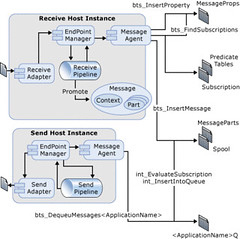
ReceiveSubscription
 
 
Picture above shows what Biztalk actually does when a message comes in or is going out.We dont see it in Biztalk architecture diagram.


What Adapter does with the Message

1.      The adapter creates a message (an implementation of the Microsoft.BizTalk.Message.Interop.IBaseMessage interface), adds a part to it (an implementation of the Microsoft.BizTalk.Message.Interop.IBasePart interface), and provides the  stream of data as the part content, the adapter writes and promotes into the message context properties related to the location, adapter type, and others related to the adapter. After the message and its context have been created, the adapter passes the message to the Endpoint Manager. The message is then processed through the receive pipeline, which has been configured for the receive location. After the message has been processed by the pipeline, a map may  be used to transform the message into the format desired before the Endpoint Manager publishes the message with the  Message Agent.
 

Out of Memory Problems: Why?

1.      Routing only If BizTalk Server is only used only for routing messages based upon promoted message properties, then  the message is streamed into the Messagebox database using the .NET XmlReader interface, and message parts are not  individually loaded into memory. In this scenario, out of memory errors are not an issue and the primary  consideration is the amount of time that is required to write very large messages (over 100 MB) into the Messagebox  database.The BizTalk Server development team has successfully tested the processing of messages up to 1 GB in size   when performing routing only.


2.       Mapping Transforming a document with a map is a memory-intensive operation. When a document is transformed by a map, BizTalk Server passes the message stream to the .Net XslTransform class, which then loads the document into a .NET  XPathDocument object for processing. Loading the document into the .NET XPathDocument can potentially expand the original file size in memory by a factor of 10 or more. This expansion may be more pronounced when mapping flat files because flat files must be parsed into XML before they can be transformed.


Solution:-

1.       Adjust the message size threshold above which documents are buffered to the file system during mapping. To modify the size threshold, create a DWORD value named TransformThreshold at the following location in the BizTalk Server  registry:

        HKLM\Software\Microsoft\BizTalk Server\3.0\Administration\TransformThreshold

        After you have created this value, enter a decimal value with the number of bytes to set the new threshold to. For  example, enter a decimal value of 2097152 to increase the message size threshold to 2 MB (from the default of 1 MB). Increase this value on systems with a large amount of available memory to improve throughput. Buffering documents to disk conserves memory at a slight cost to overall throughput.

All Inputs above are Courtesy to Microsoft.

Monday, February 4, 2008

one hour interview on CNBC with Warren Buffet last year

``Wall Street likes to characterize the proliferation of frenzied financial games as a sophisticated, prosocial activity, facilitating the fine-tuning of a complex economy. But the truth is otherwise: Short-term transactions frequently act as an invisible foot, kicking society in the shins." - Warren Buffett

I'd like to thank my pal Raul Policarpio for passing on to me this very interesting subject, a summary of the life of the world's second richest man....

There was a one hour interview on CNBC with Warren Buffet, the second richest man who has donated $31 billion to charity. Here are some very interesting aspects of his life:

1) He bought his first share at age 11 and he now regrets that he started too late!

2) He bought a small farm at age 14 with savings from delivering newspapers.

3) He still lives in the same small 3 bedroom house in mid-town Omaha, that he bought after he got married 50 years ago. He says that he has everything he needs in that house. His house does not have a wall or a fence.

4) He drives his own car everywhere and does not have a driver or security people around him.

5) He never travels by private jet, although he owns the world's largest private jet company.

6) His company, Berkshire Hathaway, owns 63 companies. He writes only one letter each year to the CEOs of these companies, giving them goals for the year. He never holds meetings or calls them on a regular basis.

7) He has given his CEO's only two rules. Rule number 1: do not lose any of your share holder's money. Rule number 2: Do not forget rule number 1.

8) He does not socialize with the high society crowd. His past time after he gets home is to make himself some pop corn and watch television.

9) Bill Gates, the world's richest man met him for the first time only 5 years ago. Bill Gates did not think he had anything in common with Warren Buffet. So he had scheduled his meeting only for half hour. But when Gates met him, the meeting lasted for ten hours and Bill Gates became a devotee of Warren Buffett.

10) Warren Buffet does not carry a cell phone, nor has a computer on his desk.

11) His advice to young people: Stay away from credit cards and invest in yourself.

***

While I do not know about the authenticity of this article I would like to share my insights on this interview:

1. My icon shows of a regimented way of living which reflects on his investing philosophy.

2. His aversion to credit cards is a sign of discipline. Why pay for the financing charges on unproductive expenditures?

3. While he may not be as sociable by way of avoiding the high society crowd, his contribution to the investing world, his invaluable shared insights makes him one of the world's well respected and greatly admired persons.

In 2006, a lunch date auction with Mr. Buffett for charity purposes raised US $620,000. In other words, one person shelled out US $620,000 (€341,000) just to have lunch with him! Would anyone pay for the same amount to have lunch with any of the other members of the "high society" crowd?

Further as stated above, Bill Gates became a devotee or protégé of Warren Buffett, to the point that Mr. Gates is now a board of director in Mr. Buffett's flagship Berkshire Hathaway and a beneficiary of Mr. Buffett's $37 billion donation to the Gates Foundation.

Could it be that winning the respect of the world's richest man is considerably worth more than that of the "high society crowd"?

4. It is the embodiment of Humility at its finest!

5. Mr. Buffett loves Coke [drinks five cherry cokes a day (!) according to CNN], his Berkshire Hathaway is Coke's second largest shareholder according to fundinguniverse.com!

6. Mr. Buffett loves to play Poker [so does Mr. Gates]! The Billionaire recently went BROKE in a Texas charity tournament last December, according to MSNBC.

Do you have what it takes to emulate Mr. Buffett? I don't.

Friday, January 4, 2008

Biztalk Server


Introduction

 This article is the first one part of a series of articles intended to illustrate the principles and applications of Microsoft Biztalk Server. The integration of enterprise applications have been a desirable goal of many organizations for years. With the consolidation of concepts (Service-Oriented Architecture-SOA, Message-Oriented Middleware-MOM), methodologies (Business Process Management-BPM, Business Process Reengineering) and standards (XML, XSD, Rosetta.NET) as well as the advent of emerging technologies such as Web Services stack of protocols (WS-*), Enterprise Service Bus (ESB) and others, then vendors have released their own solutions and thus organizations have achieved their challenging goals of automation of business process by the integration of their Information Systems. In this arena, we can find fundamentally two important products: Microsoft Biztalk Server 2004/2006 and Oracle SOA Suite.


What is Microsoft Biztalk Server?

 Microsoft Biztalk Server is the Microsoft's premiere server for developing IS integration's solutions to support and automate the business processes in organizations.


Biztalk Server architecture comprises two major components:

  • Messaging
  • Orchestration


Figure 1: Biztalk Server 2006 major components.


The messaging component allows the communication with several systems and platforms through the use adapters which implements the underlying protocol rules and data formats. It listens for messages to arrive, route them to the appropriate target systems and then sends them. This is the bottom layer and the heart of the Biztalk engine. All other components in Biztalk Server such as orchestration, Enterprise Single Sign-On, Business Activity Services, Business Activity Monitor, Business Rules Engine and Health and Activity Tracking depend heavily on this layer.


The orchestration component allows the creation, execution and management of business processes called orchestrations. It is built on top of the messaging components, therefore consuming its services such as the orchestration's communication outside the engine for the transportation and routing of messages. This component handles the state of each orchestration as well as its correlation with external business entities.


Now, I am going to explain the basic flow of messages in Biztalk Server engine as shown in Figure 2. The engine listens for messages by Receive Port. A message is an entity which comprises a header storing information about communication aspects and specific metadata as well as a body which conveys payload such as business entities. The information interchange with external systems is done by adapters which implement the necessary protocol mechanism. The wire message is received in its native format, but Biztalk engine normalizes the schemas of the internal messages using XML as the lingua franca. This task is done by the pipeline component and its sub-components specifically the disassembler component. Then internal XML message is published in the MessageBox. Subscribers consume these internal messages. The main subscribers are the Send Port and Orchestration components which subscribe to internal messages according to their metadata or message context properties. When the underlying subscribed orchestration finished processing the internal messages then it publishes them again in the MessageBox to be consumed by other subscribers. Finally, when one Send Port consumes the internal XML messages, then converts these internal messages into a wire messages according to the schema and format of the intended recipient through the associated pipeline and specifically the subcomponent Assembler. Finally the Send Port uses the underlying adapter to convey the wire message to the target system as shown in Figure 2.


Figure 2: The basic flow of message in Biztalk Server engine.


Conclusion


We have got acquainted with the architecture and main flow of message in Microsoft Biztalk Server. The following articles will explain the architecture components with more details. And finally, we're going to orchestrate a business process as an illustrative example.


Wednesday, January 2, 2008

Capture Missing Information From SQL Profiler


While SQL Profiler is a very helpful (and even invaluable) tool, it does not always provide all of the information needed to find the root cause of certain problems. If ObjectId, ObjectName, and TextData are all empty / NULL, then all you are left with is the knowledge that the event you are looking for occurred. Knowing only that the event occurred will only help in a controlled environment where you caused the event but not in production where something is happening sporadically.

Take for instance the particularly squirrelly issue of having tempdb grow at an alarming rate, far more than usual and taking up a lot more space than usual. The problem you are dealing with here is determining what is taking up the space. This can be a difficult task since since tempdb space is not always taken up only by temp tables. Many operations use tempdb as work space explicitly, such as Static and Keyset Cursors, as well as DBCC CHECKDB. Other operations use tempdb when needed (typically when there is not enough space in memory to complete the operation or store the data), such as when using DISTINCT, ORDER BY, GROUP BY, AFTER triggers, table variables, table returned in table-valued-functions, hash joins and hash aggregate operations, and when (re)creating Indexes with the SORT_IN_TEMPB option. Additionally, in SQL Server 2005, new features will also use tempdb, such as snapshot isolation level transactions and Multiple Active Results Sets (MARS). And there may be even a few more. That's a lot of possibilities of what can be contributing to tempdb growth!

So first we check to see if that data is in tables or indexes (as that might point to a source of the problem) via the reserved column of tempdb.dbo.sysindexes (be sure to divide the value in that field by 128.0 to see how much it is in Megabytes). Of course, it is very possible that very little of the data that is causing the problem is in tables given how many operations use tempdb. If this is the case we have to find out what is using tempdb. For this we can run SQL Profiler and trap events such as: Sort Warnings (indicates that a sort could not fit in memory) and Data File Auto Grow. Sort Warnings will show us many of the operations that are using tempdb in general and the Data File Auto Grow will indicate which operations are using so much data that the database has to increase the size of tempdb. Unfortunately, the SQL (statement or object) that caused either event is not recorded in the Profiler output; both TextData and ObjectId fields are empty. How unhelpful is that?
Triggers, Temp Tables, and Input Buffers, Oh My!

All is not lost, though, as we can augment the Profiler results saved to a table; we will just add a trigger to store information in the TextData field. While it doesn't matter entirely which fields you choose to report on, you must at least pick: EventClass, DatabaseID, SPID, and TextData. You should also select: EventSubClass and ApplicationName. When you run the trace, be sure to save the results to a table. After you click on "Run" and the trace starts, execute the following (assuming that you have replaced {db_name_here} in the USE statement with whatever database you are storing the trace results in). The script assumes a table name of TraceTable to store the results in. Just change the name in the ON and FROM clauses if you choose a different table name.

Please note that this has only been tested on SQL Server 2000.

USE [{db_name_here}]
GO


SET ANSI_NULLS ON
GO
SET QUOTED_IDENTIFIER ON
GO

CREATE TRIGGER [dbo].[TraceTableExtraInfo]
  ON [dbo].[TraceTable]
  AFTER INSERT
AS
BEGIN
  SET NOCOUNT ON;


  DECLARE @SQL VARCHAR(40)

  SELECT @SQL = 'DBCC INPUTBUFFER(' + CONVERT(VARCHAR(10), ins.SPID) + ')'
  FROM   inserted ins

  CREATE TABLE #DBCCInfo (EventType NVARCHAR(30), Parameters INT, EventInfo NVARCHAR(255))

  INSERT
  INTO #DBCCInfo (EventType, Parameters, EventInfo)
    EXEC(@SQL)


  UPDATE tt
  SET    tt.TextData = info.EventInfo
  FROM   dbo.TraceTable tt
  INNER JOIN   inserted ins
         ON   ins.RowNumber = tt.RowNumber
  CROSS JOIN  #DBCCInfo info
  WHERE  tt.TextData IS NULL

  DROP TABLE #DBCCInfo
END


You can then see the data from the trace with the following code:

SELECT * FROM working.dbo.TraceTable

Now there are two minor issues with this approach:

  1. You have to create this trigger each time you run the trace. This includes each time you re-run the trace, even when saving to the same table, as it will drop and recreate the table each time. The dropping of the table in turn drops the trigger.
  2. The output from DBCC INPUTBUFFER is not guaranteed to be accurate; it might be what is in the buffer after the event was caught by SQL Profiler and the row was inserted into the table. For the operations of Sort Warnings and Auto Grow it seems safe enough to assume that in the majority of cases the process that triggered that event will still be running by the time DBCC INPUTBUFFER runs since the processes needed the resource (either tempdb in the case of a Sort Warning or more File space in the case of an Auto Grow). But for the most part, if there is a real problem then you will clearly see a pattern between the event and what is in the buffer when the event is triggered.

Please note that while the example situation shown here is looking for tempdb and file growth issues, this method can be used on any Profiler event that does not return data in the TextData field. For those events that do return TextData values there is the WHERE condition in the UPDATE statement that ensures that if the TextData field is populated by Profiler, it will not be over-written by this trigger.